SUPPORT & FAQ
Si tu Clocky no funciona correctamente, por favor contáctanos, explica el problema con cierto detalle y los pasos que has tomado para identificar qué sucede. En la mayoría de los casos, podemos resolver el problema y hacer que tu Clocky vuelva a funcionar en poco tiempo.
Download Clocky manual
Clocky: dile adiós al botón de repetición (snooze)
Un estudio reciente reveló que 1 de cada 4 personas que usan la alarma de su smartphone ¡se quedan dormidas!
Los smartphones hacen que sea muy fácil presionar “snooze” o incluso apagar la alarma antes de levantarte. Clocky se asegura de que incluso los dormilones más profundos se levanten a tiempo gracias a su alarma fuerte y porque te obliga a salir de la cama. Además, el proceso de buscar a Clocky te despierta por completo y te deja con más energía.
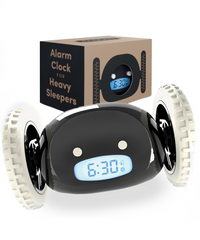
Puedes activar las ruedas de Clocky para que, cuando suene la alarma, salte de tu mesa de noche y corra de forma aleatoria por tu habitación.
También puedes configurarlo para que se quede en su lugar y usarlo como un despertador tradicional.
¡Sí! Puedes usar el snooze una sola vez si así lo deseas, o desactivarlo por completo.
Clocky solo correrá después de usar el snooze (si lo tienes activado). Limitar el número de repeticiones evita la somnolencia causada por presionar snooze repetidamente.
También puedes configurarlo para que no se mueva y usarlo como un despertador normal.
Clocky es ideal para todas las edades: estudiantes y adultos que necesitan despertarse a tiempo para la escuela o el trabajo. Está diseñado pensando en todo tipo de durmientes, incluso los de sueño profundo.
Evita comprar imitaciones que pueden parecerse al original. No funcionarán igual.
Configuración de Clocky
Usa baterías nuevas: utiliza únicamente baterías de litio Duracell nuevas, debido a variaciones de tamaño con otras marcas.
No recomendamos baterías alcalinas.
Usa baterías nuevas: solo baterías de litio; se recomiendan Duracell.
Revisa la polaridad: la orientación de las baterías es diferente a la de otros dispositivos. Intenta retirarlas y colocarlas nuevamente.
Revisa la tapa de la batería: asegúrate de que esté bien atornillada.
Modo demo: presiona los botones A y T al mismo tiempo para activar el modo de prueba. Las ruedas comenzarán a moverse.
Use new batteries: Instead of Alkaline batteries, it is best to use Duracell Lithium batteries because of size variations with other brands.
Check battery door: Ensure that the battery door is screwed on tightly.
Try Demo mode:Test the movement (and let Clocky run off your nightstand) by using demo mode. Press the A and T buttons on the top simultaneously to operate the test mode. The wheels will start to move.
Turn on Wheels: Make sure the wheels button is turned on. When turned on, you will see a wheel icon on the display.
Check Snooze Time: Check the snooze time by pressing the 'a' button twice rapidly. If it is set to 0, then your Clocky will run as soon as the alarm sounds (no snoozing allowed!). If it is set to 1-9, you can snooze one time for 1-9 minutes. Your Clocky will not move until after you have pressed snooze once and those minutes have passed.
Try Demo mode: Press the A and T buttons simultaneously to operate demo mode. The wheels will move.
Follow these steps to set your snooze time:
- Press the 'a' button twice rapidly. The snooze time is usually set to a 0 minute default.
- Press the 'm' button to choose your desired number of snooze minutes. 0, 1, 2, etc. can be chosen.
- If 0 is chosen, the snooze button will be disabled.
- To leave this mode, press the 'a' button again or just wait for the current time screen to resume.
Important! Make sure that the wheels button is turned on if you want Clocky to move. When turned on, a wheel icon will appear on the display.
If you are in the 12-hour mode and your clock is set to one of the AM hours, you will not see a change when you switch into 24-hour mode.
Ordering, Shipping, Returns
We also sell in multiple Amazon marketplaces, so you're welcome to check our store and buy from there for better shipping options. We sell under CLOCKY on: MX, CA, IT, FR, ES, DE, UK, SW, NL, JP, AU, SG. Please reach out with any questions to team@clocky.com!
 ✔Mechanical malfunctions✘Accidental damage or misuse